 Pastely
 Archly
The best screen time apps for Mac.
Ten apps that track or limit screen time on a Mac, each the best at something. We make Timecard, so it's first, but every entry says who should pick it, and what it doesn't do. Facts come from each app's own pages, checked October 2026.
- 01

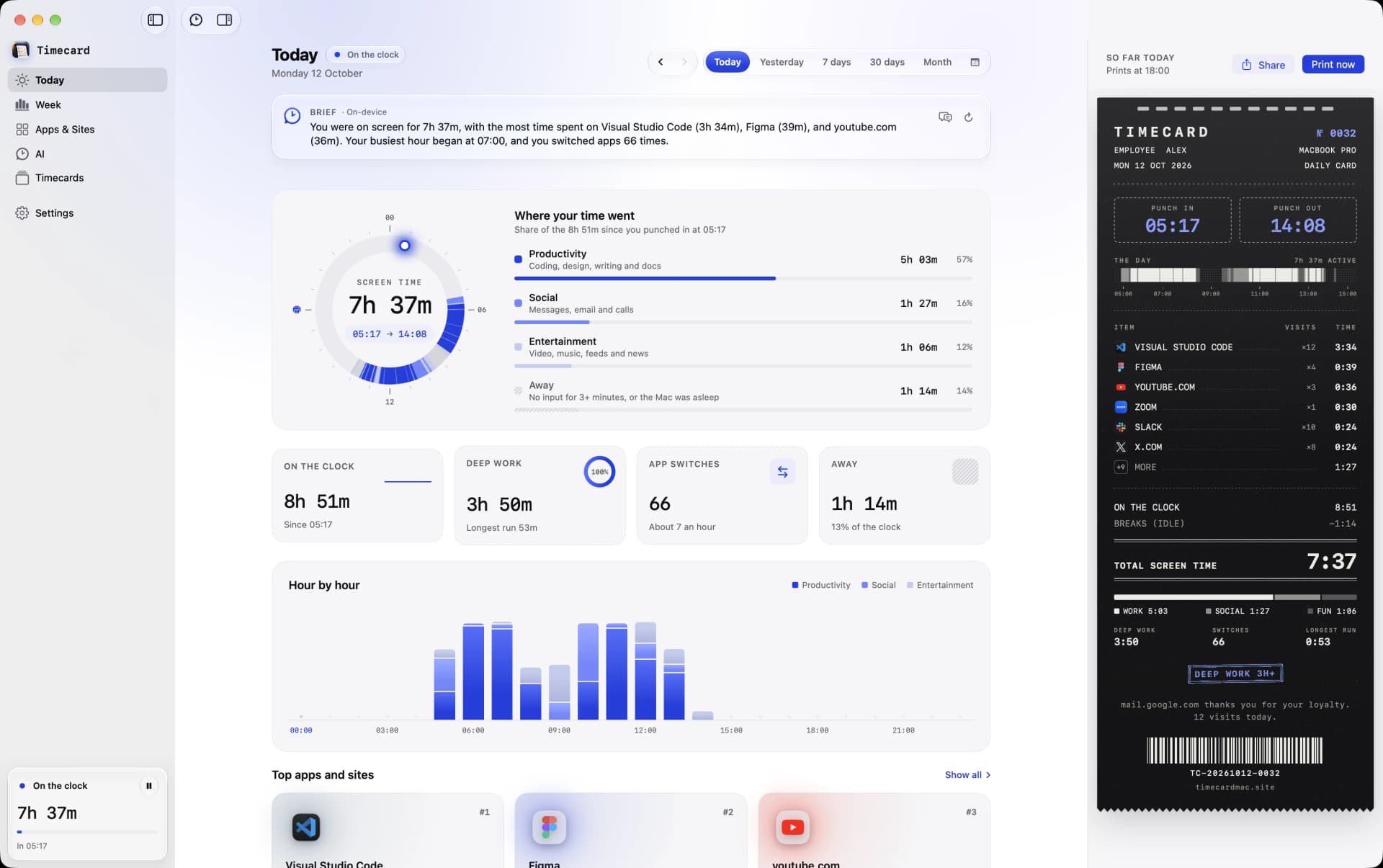
Timecard
Best overall for Mac
$5 once
Mac, macOS 14 or later
Pick it if
- You want every app and website, in every browser, kept forever.
- You want daily limits that block, with a way to make your case.
- You use AI coding tools and want their time and cost tracked.
Doesn't have
- Teams and client billing
- 02

Screen Time
Best free, built-in option
Free
Mac, iPhone, iPad
Timecard vs Screen Time, in detail →Pick it if
- A rough daily total is all you need.
- You're setting limits on a child's devices with Family Sharing.
- You want one view across your iPhone and your Mac.
- You'd rather not install anything.
Doesn't have
- Ai coding usage
- Daily summary
- Teams and client billing
- 03T
Timing
Best for billing clients on Mac
From $11/month billed yearly
Mac
Timecard vs Timing, in detail →Pick it if
- You bill clients by the hour and need projects and timesheets.
- You want your time synced between several Macs.
- You work in a team that shares projects.
Doesn't have
- Limits that block apps and sites
- 04

RescueTime
Best across Mac, Windows and phones
From $7/month billed yearly, $9 monthly
Mac, Windows, Linux, iPhone, Android
Timecard vs RescueTime, in detail →Pick it if
- You work on Windows or Linux, or want your phone in the same reports.
- You need timesheets and team reports.
- You want focus sessions that run across all your devices.
Doesn't have
- Account
- Where your data lives
- Ai coding usage
- 05R
Rize
Best AI tracker for teams
From $9.99/month billed yearly
Mac, Windows
Timecard vs Rize, in detail →Pick it if
- You're on Windows, or need client and project reporting.
- You want AI chat about your productivity and integrations like Linear or Asana.
- You work in a team with shared dashboards.
Doesn't have
- Account
- Where your data lives
- 06A
ActivityWatch
Best free and open source
Free, open source
Mac, Windows, Linux, Android
Timecard vs ActivityWatch, in detail →Pick it if
- You want free and open source, and don't mind setting things up.
- You use Windows or Linux.
- You want to build your own reports on raw data.
Doesn't have
- Limits that block apps and sites
- Ai coding usage
- Teams and client billing
- 07

Opal
Best for blocking on phone and Mac
Free plan; Pro $99.99/year or $399 lifetime
iPhone, Android, Mac
Timecard vs Opal, in detail →Pick it if
- Your phone is the problem, and you want blocking there too.
- You want a Hard Mode you can't turn off.
- You want one app across phone and computer.
Doesn't have
- Account
- Where your data lives
- Tracks websites
- Ai coding usage
- 08

Freedom
Best for scheduled blocking
Free plan; $3.33/month yearly; one-time Forever plan
Mac, Windows, iPhone, Android, Chromebook
Timecard vs Freedom, in detail →Pick it if
- You want the same blocklist on your phone and computer.
- You want blocks on a schedule, like no social media before noon.
- You don't want anything tracked at all.
Doesn't have
- Account
- Tracks apps automatically
- Tracks websites
- History
- Ai coding usage
- Daily summary
- Teams and client billing
- 09T
Toggl Track
Best timers for billable hours
Free plan; from $9/user/month billed yearly
Web, Mac, Windows, iPhone, Android, browser extension
Timecard vs Toggl Track, in detail →Pick it if
- You bill clients and need billable rates, projects and invoices-ready reports.
- Your team tracks time together.
- You want to log time from your phone or the web.
Doesn't have
- Account
- Where your data lives
- Tracks websites
- Limits that block apps and sites
- Ai coding usage
- 10

WakaTime
Best for coding stats in editors
Free; paid from $8.25/month billed yearly
Plugins for most editors, on any OS
Timecard vs WakaTime, in detail →Pick it if
- You want per-language and per-project coding stats across many editors.
- Your team wants shared coding dashboards.
- You code on Windows or Linux as well.
Doesn't have
- Account
- Where your data lives
- Tracks websites
- Limits that block apps and sites
How we compared them
Each app was judged on what a Mac user asks: does it track apps and websites automatically, in which browsers, how long it keeps history, whether it can block, where the data lives, and what it costs over time. Prices and features are from each app's own pricing and feature pages. See every comparison side by side.
Screen time apps for Mac
questions
What is the best screen time app for Mac?
For most people on a Mac, Timecard: it tracks every app and website in every major browser, keeps history forever, blocks apps and sites when a daily limit runs out, and costs one payment. Apple's Screen Time is the best free option if a rough daily total is enough.
Is there a free screen time app for Mac?
Yes. Apple Screen Time is built into macOS and free, but keeps about four weeks and sees websites mainly in Safari. ActivityWatch is free and open source, and keeps data on your Mac.
Does Mac have screen time built in?
Yes. Open System Settings › Screen Time. It shows app use for about four weeks and can set App Limits and Downtime. Its website limits only work in Safari.
Which screen time app can block websites in Chrome on Mac?
Timecard blocks sites in Chrome, Arc, Brave, Edge and Safari when their daily limit runs out. Freedom and Opal block sites on schedules or rules. Apple Screen Time only blocks websites in Safari.