ComparisonScreen time app for Mac · Checked October 2026

Timecard vs Screen Time

Screen Time comes free with every Mac and is fine for a quick look at today. But it keeps about four weeks of history, shows websites mainly for Safari, and its website limits only work in Safari. Timecard tracks every app and site in every major browser, keeps it forever, and blocks over-limit sites in Chrome and Arc too.

Timecard

VS

Screen Time

$5 once
Price
Free
Not needed
Account
Not needed
Mac
Runs on
Mac, iPhone, iPad

01

The short answer

Choose Screen Time if

Best for: free, for a quick look and family limits

  • A rough daily total is all you need.
  • You're setting limits on a child's devices with Family Sharing.
  • You want one view across your iPhone and your Mac.
  • You'd rather not install anything.

Choose Timecard if

Best for: seeing, and limiting, where your Mac day goes

  • You want YouTube, Figma and Gmail as separate lines, not one line that says Chrome.
  • You want to look back further than four weeks.
  • You want limits that block sites in Chrome, Arc and Brave, not just Safari.
  • You use Claude Code or Codex and want that time next to your day.
  • You want a summary of the day to arrive without opening System Settings.

02

Pricing, side by side

Screen Time is free. Timecard is a single payment for what it adds.

TimecardPay once

$5once, for 1 Mac

1 Mac · $52 Macs · $105 Macs · $2510 Macs · $50
  • No subscription, ever
  • Every update included
  • No account; your activity stays on your Mac
  • 14-day refund
Get Timecard for $5
Screen TimeBuilt into macOS
  • Screen TimeIncluded with macOS, iOS and iPadOSFree
  • App Limits and DowntimeWebsite limits apply in SafariIncluded
  • Family SharingLimits for children's devicesIncluded
  • HistoryOlder weeks are dropped~4 weeks

From Screen Time's own pages, October 2026.

03

Feature by feature

Timecard Screen Time
Tracking
Tracks apps automaticallyYesYes
Tracks websitesYes, in Safari, Chrome, Arc, Dia, Brave, Edge, Vivaldi, Opera and CometMainly Safari; other browsers count as one app
HistoryForever, plus the weeks Screen Time already keptAbout four weeks
Privacy
AccountNot neededNot needed
Where your data livesOn your Mac, in one local fileOn your devices, optional sharing through iCloud
Limits
Limits that block apps and sitesYes: blocks the tab or covers the app, then asks whyApp Limits and Downtime; website limits in Safari only
Beyond tracking
AI coding usageClaude Code, Codex, Cursor, opencode, Gemini CLI: time, tokens, API valueNo
Daily summaryA timecard printed from the notch every eveningNo
Teams and client billingNo, it's built for one personFamily Sharing, for children's devices
Availability
PlatformsMac, macOS 14 or laterMac, iPhone, iPad
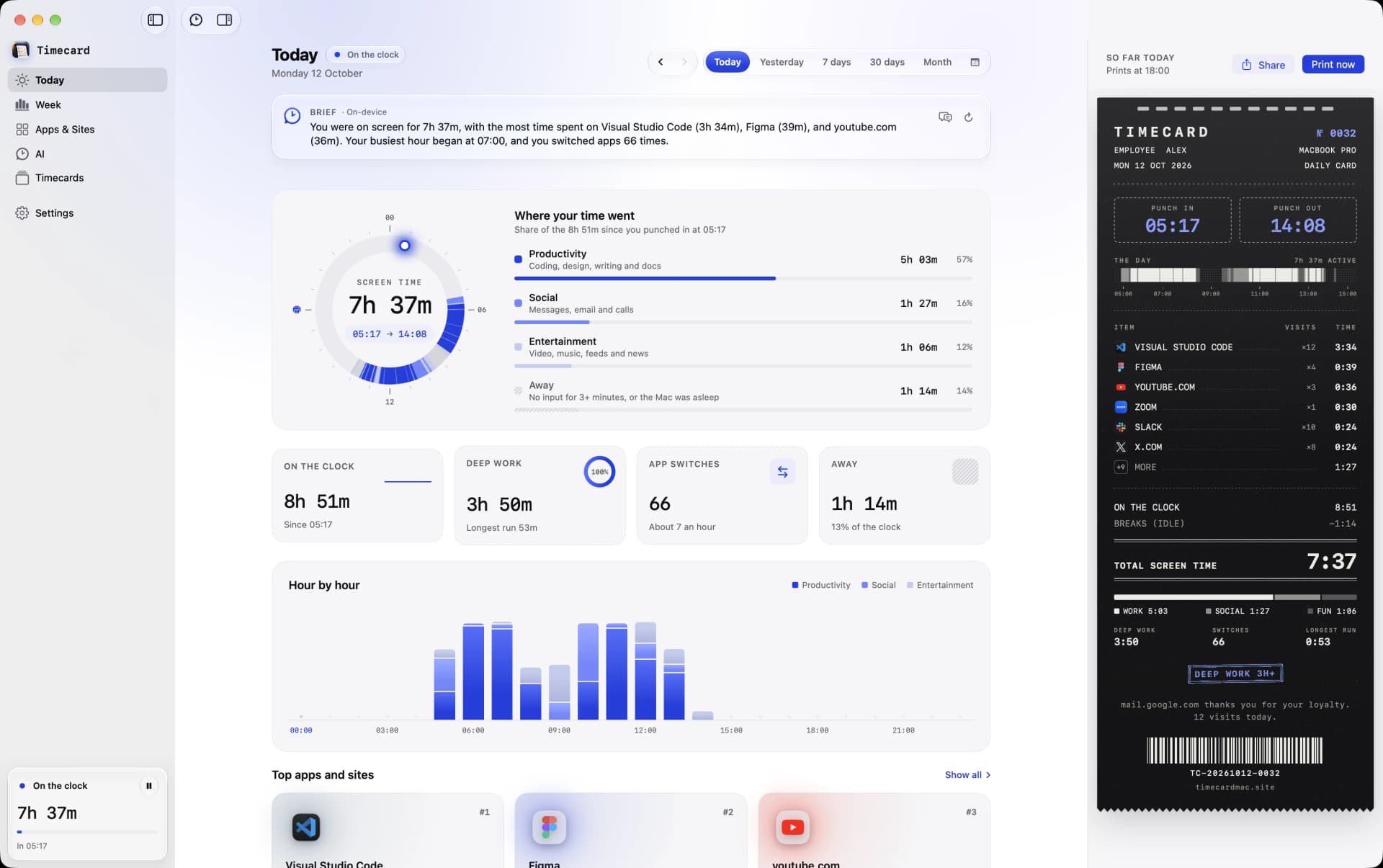
Timecard's Today view on a Mac with screen time per app and per website
Timecard's Today view: every app and website, split by browser.

04

What really sets them apart

01

Every website, in every browser

Screen Time sees websites in Safari, and other browsers mostly appear as a single app. Timecard reads the front tab of Safari, Chrome, Arc, Dia, Brave, Edge, Vivaldi, Opera and Comet, so a day in Chrome becomes the sites you actually used.

02

History that doesn't expire

Screen Time keeps roughly the last four weeks. Timecard keeps everything in one file on your Mac, and on first launch it imports the weeks macOS already has, so you don't start from zero.

03

Limits that hold

Screen Time's App Limits offer One More Minute and Ignore Limit, and its website limits only apply in Safari. When a Timecard limit runs out, the tab goes blank in any supported browser, or the app is covered, until you close it or explain why you need more time.

04

You don't have to choose

Timecard picks up the App Limits you already set in Screen Time, including ones synced from your iPhone, and keeps them linked. Keep Screen Time for your phone and family; use Timecard for the detail on your Mac.

Timecard vs Screen Time
questions

What's the best screen time app for Mac?

For most people on a Mac, Timecard: it tracks every app and website automatically, keeps the data on your Mac, blocks apps and sites when a daily limit runs out, tracks AI coding usage, and costs one payment with no account. Screen Time is still the better fit if a rough daily total is all you need.

Is Timecard a replacement for Screen Time?

It can be, on your Mac. Most people keep Screen Time for their iPhone and family, and use Timecard for the Mac: every website in every browser, history forever, and limits that block outside Safari. Timecard reads your Screen Time limits, so the two work together.

Does Screen Time on Mac track websites?

Mainly in Safari. Time in Chrome, Arc or Brave mostly shows up as the browser itself. Timecard splits time in those browsers into the real websites.

How long does Screen Time keep history on a Mac?

About four weeks. Timecard imports those weeks when you first open it, then keeps everything from then on, for as long as you use it.

Compare Timecard with